


Virtual Labs
Additional computational resources for students through Hábrók (H100 GPUs), OpenStack (cloud infrastructure), and Sandbox (virtual environments).
Virtual Labs connects the cloud with the classroom. It provides students with the environments and resources necessary to solve complex homework assignments. It fundamentally unlocks new kinds of assignments that would normally not be taught or simulated without cloud resources. Virtual Labs comes in 3 flavours:: Hábrók, OpenStack, and Sandbox.
All of the Virtual Labs options run on the local datacenters of the University of Groningen.
Sandbox
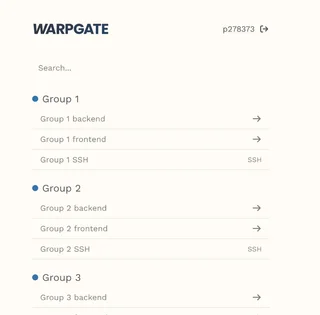
Virtual Labs Sandbox grants students access to virtual environments that are pre-configured for courses. Environments can represent any virtual setup, including virtual machines, containers, pods or even multi-node clusters. The course staff can choose which operating system, packages and software tools are available in the environment. It is also possible to make networking choices, such as making the student environments be able to talk to each other, or giving a student group access to multiple machines connected together.
Sandbox supports a range of connectivity options, including SSH, web-based access, and kubectl access. All access is securely managed through the institution's login system, so students do not have to work with SSH keys or other credentials. These environments can also host websites, which can be accessed through the login system, to allow authenticated access to web-based applications.
Hábrók
Virtual Labs Hábrók provides high-performance resources such as GPUs (e.g. NVIDIA H100s) to solve computationally intensive assignments such as machine learning, image processing and scientific simulations. It works using a job scheduling system where students submit jobs that are scheduled onto the available hardware.
Contrary to research-focused clusters, Virtual Labs Hábrók is a education-focused cluster. The number of users is tightly controlled to keep queue times low, which is required for deadline-driven assignments, where students cannot wait a week for their job to start.
OpenStack
Virtual Labs OpenStack provides students with access to a compute cloud environment similar to Amazon Web Services, Microsoft Azure, and Google Cloud. Students get allocated a quota, and can themselves deploy virtual machines and storage, manage networking, routing and firewalls, and install software.
The cloud is based on the industry-standard OpenStack software, and has both a dashboard and an API.
Use cases
Web Engineering
In Web Engineering, students learn how to build web applications. During the course, students have to deploy their application on a Virtual Labs sandbox environment to learn how to host a website. Students can deploy the application either natively, or using Docker. The application can either be deployed manually by the students, or through an automated CI/CD pipeline provisioned by Repository Management, since the course also uses Repository Management for git repositories. Teaching staff can then access the deployed application using the Virtual Labs web UI to assess functionality. Assessment of the code is done through Repository Management.
- Languages — HTML, CSS, JavaScript
- Assignment types — Web applications
Software and System Security
In Software and System Security, students learn how to work with security testing and binary analysis tools. Students may have trouble installing the right tools onto their own machines to perform the assignments of this course, so they are provided with a virtual environment through Virtual Labs Sandbox that has all the necessary tools pre-installed. Students can access the environment through SSH, and use it to perform security testing and binary analysis on provided vulnerable applications. Teaching staff can also access the environments to assess the students' work.
- Languages — C/C++, Web (SQL, OpenAPI)
- Assignment types — Security testing, binary analysis
Ethical Hacking
In Ethical Hacking, students learn how to perform penetration testing on networks. Students are provided a Virtual Labs Sandbox environment that contains Kali Linux, a special Operating System designed for hacking. All the necessary packages for the course are pre-installed, and the students need to attack hosted targets within the same network that are deliberately left vulnerable. Students are also tasked with setting up vulnerabilities on their environments, and then students are asked to try to break into each other's environments. Contrary to other courses, the Virtual Labs network is configured such that the student environments can see other student environments. All hacking is contained within the internal network with strict firewall rules to isolate the environments and allow the students to freely explore without being worried about breaking anything.
- Languages — None
- Assignment types — Penetration testing, vulnerability discovery
Cloud Computing and Cloud-based Applications
In Cloud Computing and Cloud-based Applications, students are provided a legacy web application. Through multiple assignments, they transform that web application into a modern cloud-based application. In the first assignment, they containerize the application using Docker. For this, students are provided a Virtual Labs Sandbox environment with Docker pre-installed. In the second assignment, students deploy the application on a Kubernetes cluster. For this, students are provided a Virtual Labs Sandbox environment with kubectl access to a 3-node Kubernetes cluster. In the final assignment, students deploy the application on a cloud environment. For this, students are provided with access to Virtual Labs OpenStack, where they are tasked with designing the networking, routing, virtual machines and storage for creating their full production-ready cloud environment, and then they are tasked with deploying the final application on that environment they created themselves.
- Languages — Docker, Kubernetes, OpenStack
- Assignment types — Containerization, Kubernetes deployment, Cloud deployment
Interested?
Are you interested in using Virtual Labs? Contact the Digital Lab at digitallab@rug.nl.